The Split Ergonomic Keyboard for Wrist Pain UK Buyers Ask About Does Not Come Apart. Its Sharpest Critic Still Gave It Four Stars.
Search for a split keyboard and you picture two halves you can shove apart to shoulder width. Arteck's is one moulded arch that never separates, and for plenty of sore wrists that turns out to be fine. The catches sit elsewhere: three of the thirteen reviewers I read call it Bluetooth when the listing never does, and the most useful thing on the whole page is a four-star review arguing it is the wrong keyboard.
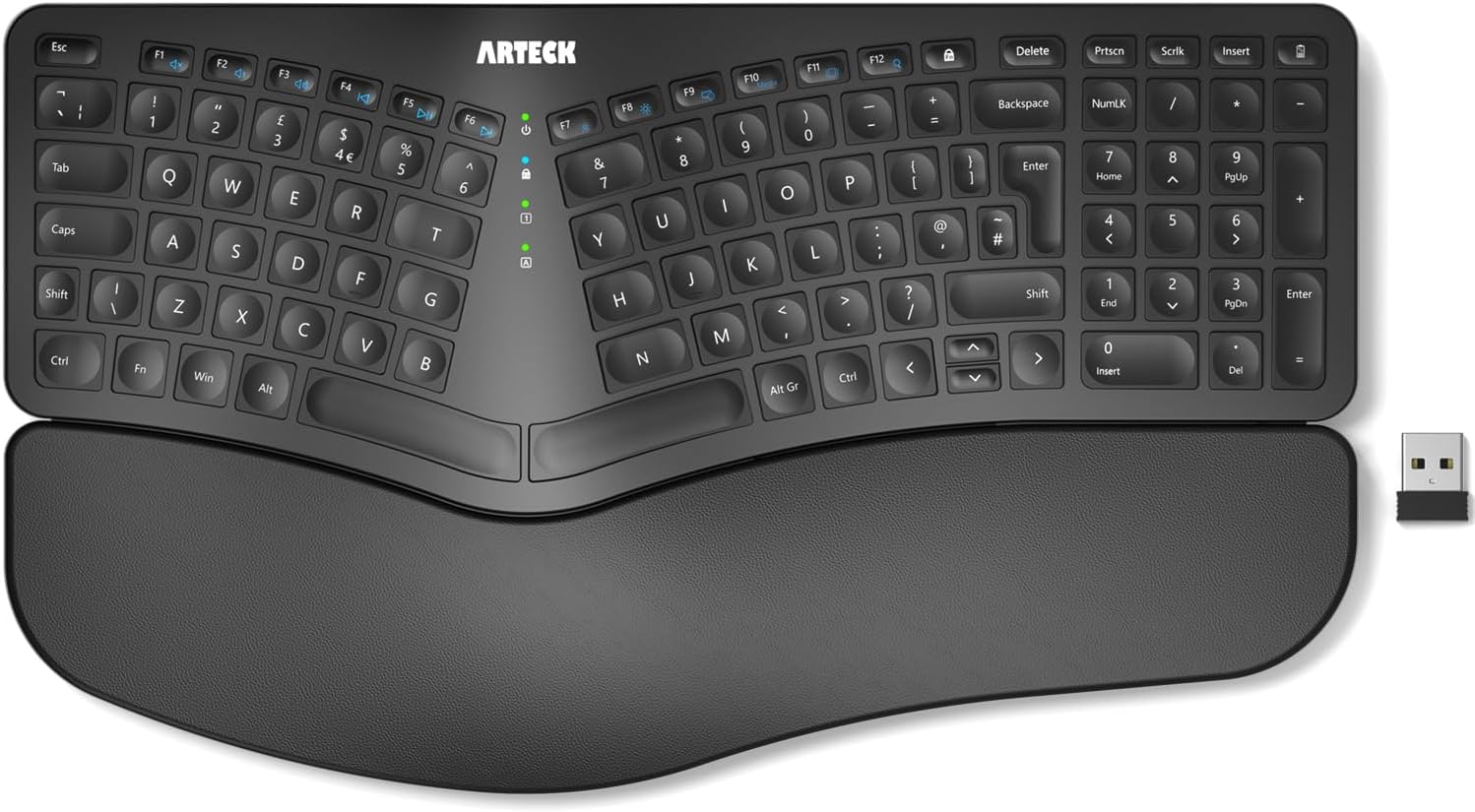
- Called Split, Built as One Fused Arch
- It Is Not Bluetooth. Three Reviewers Think It Is.
- Split Ergonomic Keyboard for Wrist Pain UK Buyers: Does It Help? Five Answers, One Hesitation
- The Most Useful Review Is a Four-Star One About a Different Keyboard
- That Lift Verdict Came From Two Legs. The Underside Has Four.
- Backspace Sits Flush Against NumLK. The Photo Tells You the Rest.
- Nobody in This Sample Gave It Fewer Than Four Stars. Four Still Had to Contact Support.
- Buy the Arch, Not the Idea of a Split
Ergonomic keyboards ask you to relearn typing, and most people only sign up for that once their wrists have started making the decision for them. So the search runs roughly like this: split keyboard, wrist pain, UK. Arteck's turns up near the top of it, at a price that does not require a conversation with anyone.
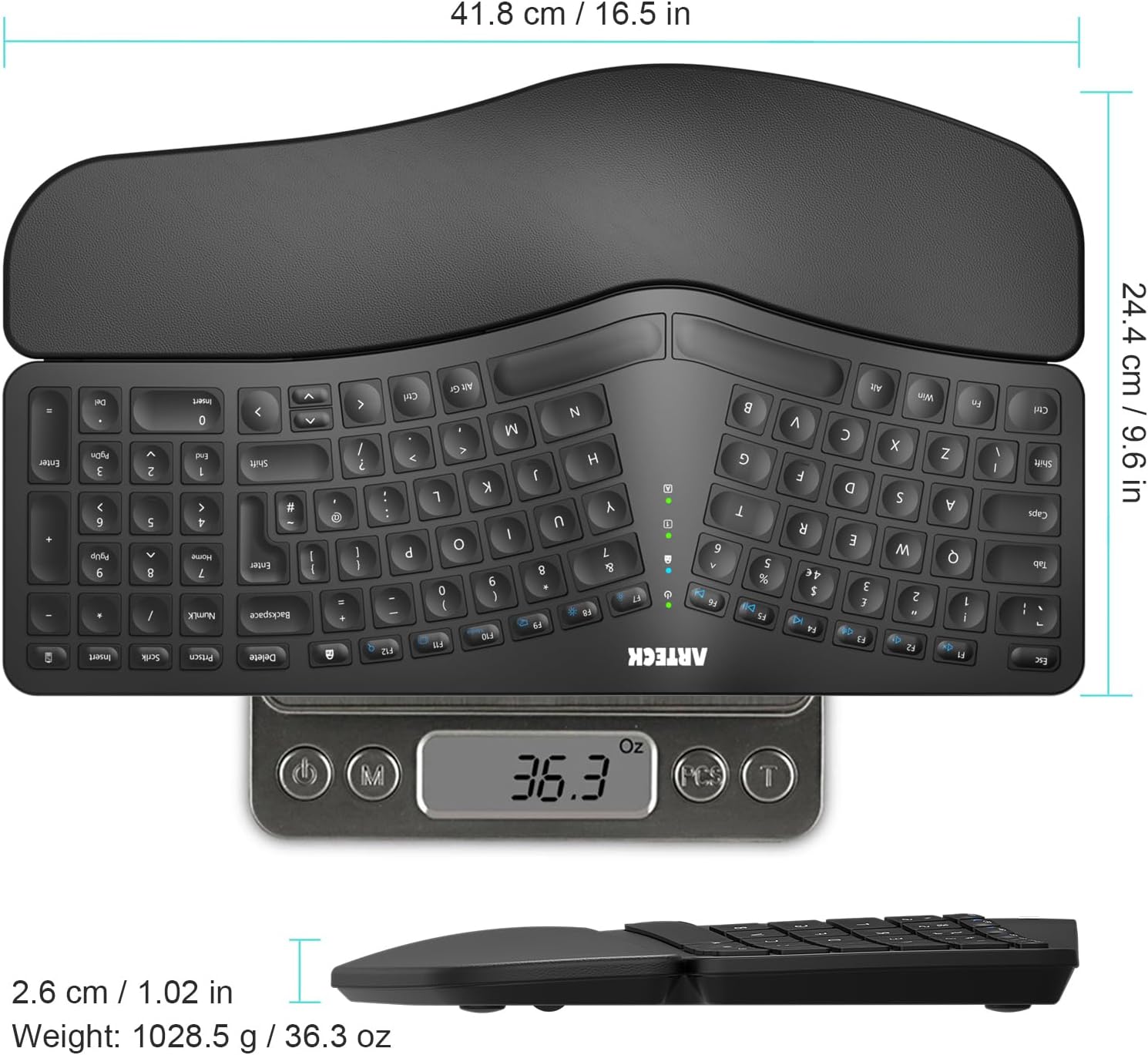
Before anything else, look at the photo. This is one piece. The left and right key blocks are angled away from each other and fused into a single moulded shell, the way Microsoft's Natural boards have always done it. It does not come apart. You cannot push the halves out to shoulder width. If that is what the word split put in your head, stop reading and buy something else, because no amount of good reviews will turn this into that. Everything below assumes a fixed arch is what you want.
What follows comes from thirteen reviews Amazon served on the product page, plus the seven listing photos, which turn out to carry more hard information than the listing text does. Both sources need a caveat, and I would rather hand it to you now than bury it at the bottom.
Called Split, Built as One Fused Arch
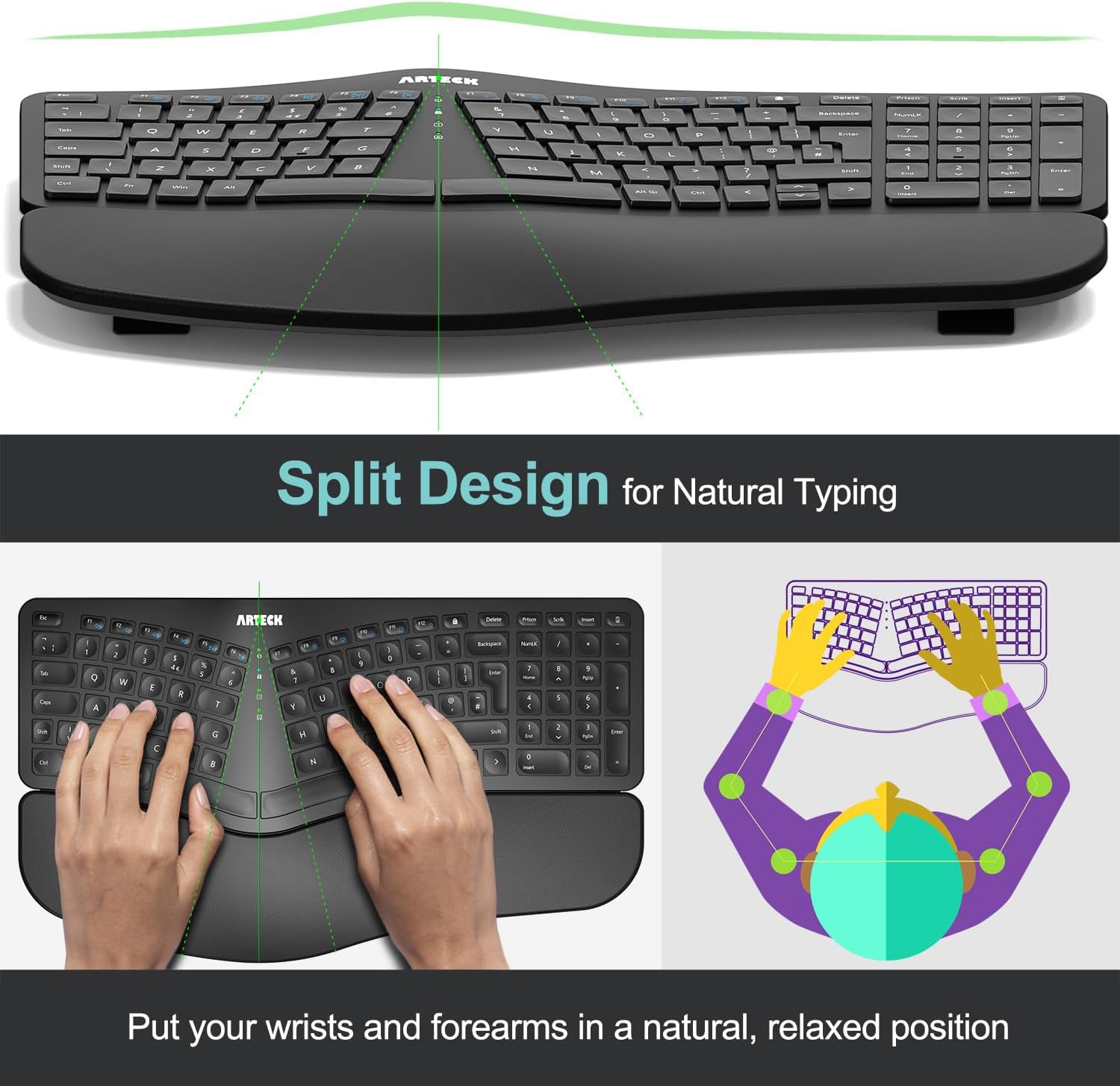
Arteck's own diagram settles it. The key blocks splay away from a centre line, the whole thing is a single shell, and the caption reads "Split Design for Natural Typing" with the promise underneath: "Put your wrists and forearms in a natural, relaxed position". That is the Microsoft Natural formula, and it has worked for a lot of people for a long time. It is not the two-piece, shove-them-apart split that the mechanical keyboard forums mean by the word, and the gap between those two things is where disappointed buyers come from.
The listing text does not give you a single dimension. The photos do, and they are worth reading properly: 41.8cm wide, 24.4cm deep, 2.6cm tall, and 1,028.5g sitting on a scale in Arteck's own photograph. Sit with the depth figure for a second. That is nearly 25cm of desk gone, front to back, because the wrist rest is part of the shell rather than a separate pad you can slide away. On a shallow desk or a pull-out keyboard tray, measure first.
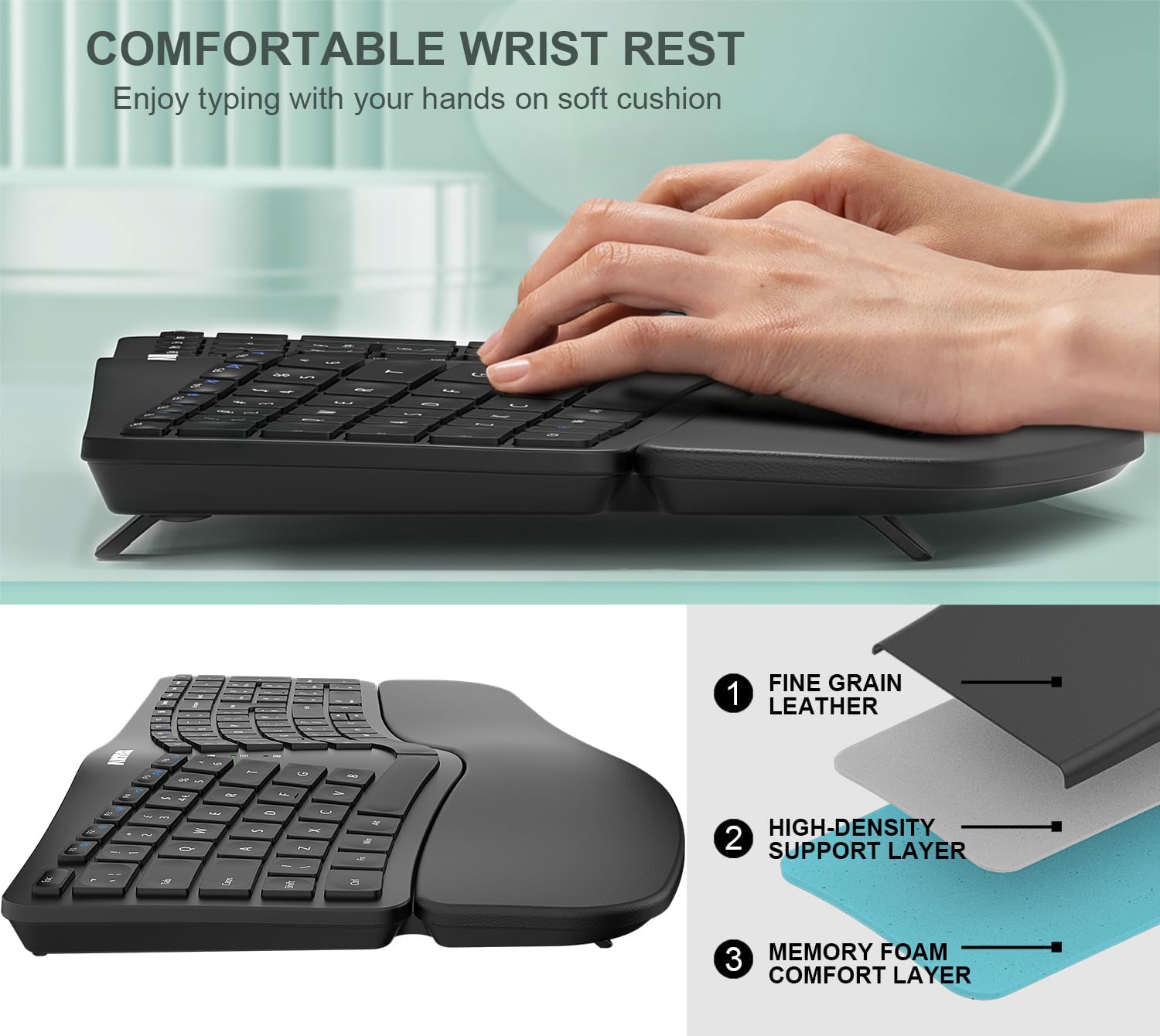
The wrist rest gets a three-layer exploded diagram in the photos that the text scrape never mentions. Arteck labels the layers fine grain leather, a high-density support layer, and a memory foam comfort layer. The bullet points reduce all of that to "Soft cushioned wrist rest". One reviewer calls it "Integrated wrist and hand rest is an added bonus too" and, in the same sentence, names the consequence: "it’s bigger than your average keyboard".
It Is Not Bluetooth. Three Reviewers Think It Is.
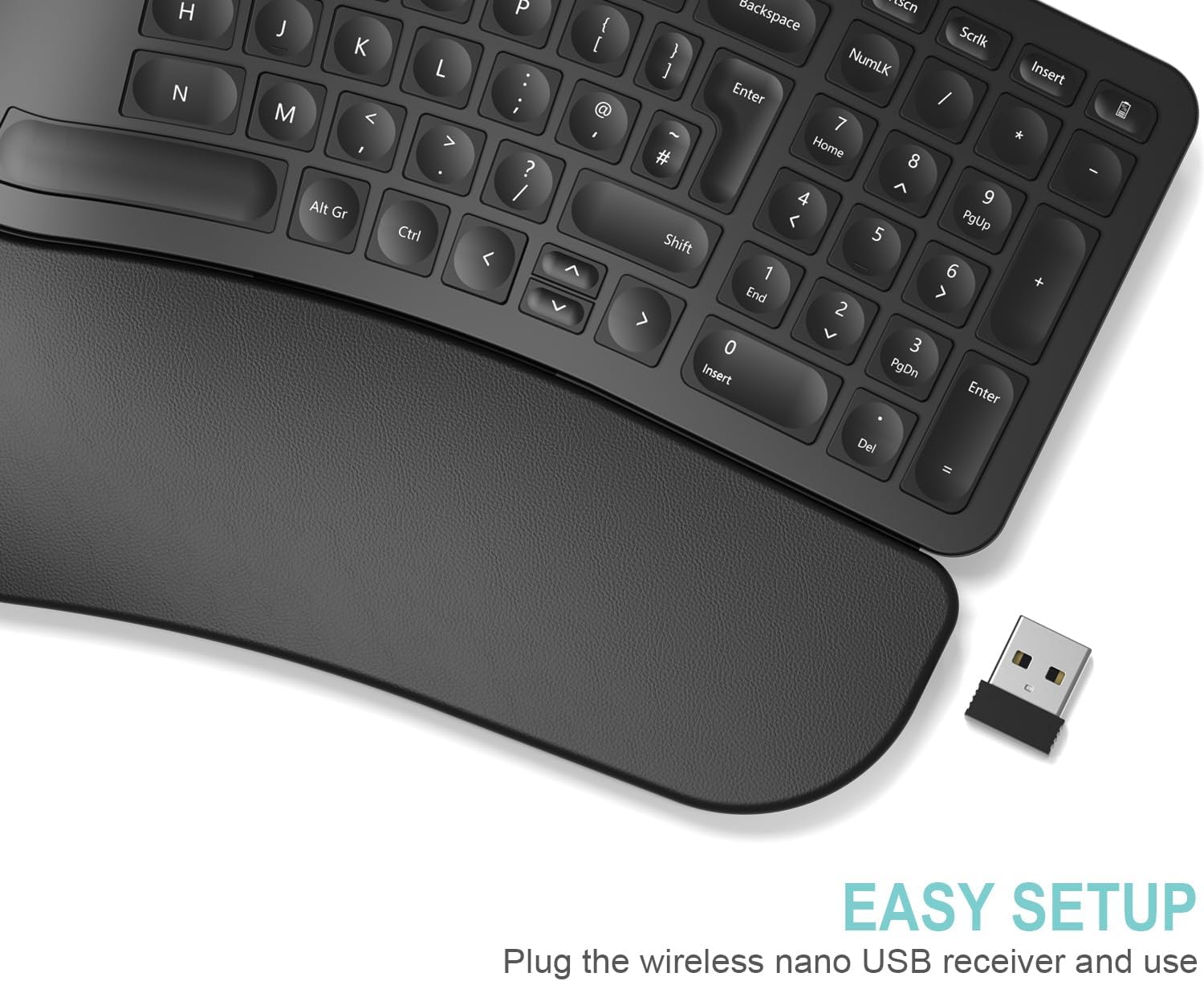
This is the one that will bite somebody. The product title says "2.4G USB Wireless". The bullets tell you to insert the nano USB receiver and go. The setup photo says "Plug the wireless nano USB receiver and use". Across all seven listing photos and all five bullet points, the word Bluetooth does not appear once.
Three of the thirteen reviewers use it anyway, and all three are UK buyers. One praises the "easy Bluetooth connection". Another says it "connected by Bluetooth with no problems", then adds a parenthesis that quietly gives the game away: "if you're unable to connect via Bluetooth there is a usb connector". The third, reviewing at four stars, names it as the one thing the Arteck holds over the Microsoft board they would rather own: "what the Arteck has over the 4000 is it is bluetooth".
They mean wireless. People have said Bluetooth when they meant wireless for twenty years and it usually costs nobody anything. It could cost you something here. A 2.4GHz dongle needs a free USB-A port, permanently, and it is the only connection method the listing describes. If you were planning to pair this with an iPad, or a MacBook with nothing but USB-C on it, or a work laptop where IT has locked the ports down, note that none of those three reviewers describes doing anything of the kind. They are calling a dongle Bluetooth, and the listing never claims the keyboard can pair without one. Believe the listing, or buy from somewhere with a return policy you trust.
Split Ergonomic Keyboard for Wrist Pain UK Buyers: Does It Help? Five Answers, One Hesitation
Five of the thirteen reviewers say something about their wrists, hands or forearms. Four are positive, one is not, and the one who is not has done this before.
The fullest account comes from a UK reviewer who arrived here off a mechanical board with "serious arm, wrist and finger pains". It had got bad enough that they "couldn’t even click on a mouse without serious pain". After the switch, they describe it turning "a potentially permanent RSI injury" into "a much more manageable and far less painful work experience", and sign off with "By far my best keyboard in over 25 years of working in an office environment!"
A second UK buyer bought it for their mother and says it "helps with her hours at work and hand and joint aches". A US reviewer who came to it from flat keyboards writes "I no longer have any wrist discomfort after the long work day and gaming sessions". A German reviewer, typing at home, noticed on the first working day that their hands and wrists felt looser and less tense than before.
Then the hesitation. Roli R. is the one buyer in the sample who has treated wrist pain with an ergonomic keyboard before, having previously run a Microsoft Ergonomic 4000. They give the Arteck four stars, and when they pose their own question about whether it will prevent their RSI, the answer is a flat "probably". Deeper into the review comes an aside worth more than the paragraph around it: "Just typing this review has got my wrist twinging a bit". They are typing on the Arteck as they write that.
These are Amazon reviews rather than clinical evidence, and I am not a clinician either. What the sample actually supports is narrow: several people with sore hands moved to this board and felt better, and one person with a longer history felt only partly better. Nobody in this sample reports getting worse, but hold that thought until the last section, because of what this sample is. If your wrists have become a medical matter, that is a conversation for a GP or an occupational health assessment, not an Amazon review, and definitely not this page.
The Most Useful Review Is a Four-Star One About a Different Keyboard
Exactly one of the thirteen reviewers weighs this against a specific named rival, and it is the most valuable thing on the product page. (One other gets close, saying only that it is cheaper than the branded names they have used before and that the quality is comparable, without naming any of them.) Roli R. gave it four stars, titled it "Adequate But Not As Good As The Microsoft Ergonomic 4000", and wrote close to a thousand words. Thirty people marked it helpful, which is ten times the next-highest score in the sample.
The opening is the part to read twice. "is the Arteck as good as the Microsoft Ergonomic 4000? In a word, no." Then, immediately: "is it an adequate replacement for the 4000? Will it prevent my RSI? To which I would answer yes and probably." That is a no and a yes in the same breath, and both halves are useful.
The case against comes down to size. They call the Arteck "a good 30% or so smaller than the 4000" and reckon "the smaller size means that your hands aren't quite as relaxed and spread out on the keyboard". To their credit they immediately flag their own bias, noting they have "rather large hands" and that "anyone who found the 4000 too big in that respect, may disagree with me". Take the hint. If a 4000 was ever too big for your hands, that paragraph is a recommendation wearing a complaint's clothes.
Where they land: "It is adequate though and so I will carry on using it until I can afford to get a 4000 with bluetooth." They also note the 4000 "has rocketed in price", which is why they are here at all. And on desk versus travel: "The Arteck will always be my travel keyboard because lugging around the 4000 on holiday wasn't fun, but when it comes to typing at my desk, size matters and bigger is better!"
One number they did not have: this thing weighs 1,028.5g and spans 41.8cm. That is a kilo of keyboard. It travels better than a 4000, which is not a high bar, and nobody should read the phrase travel keyboard here and picture something that slides into a laptop sleeve.
That Lift Verdict Came From Two Legs. The Underside Has Four.
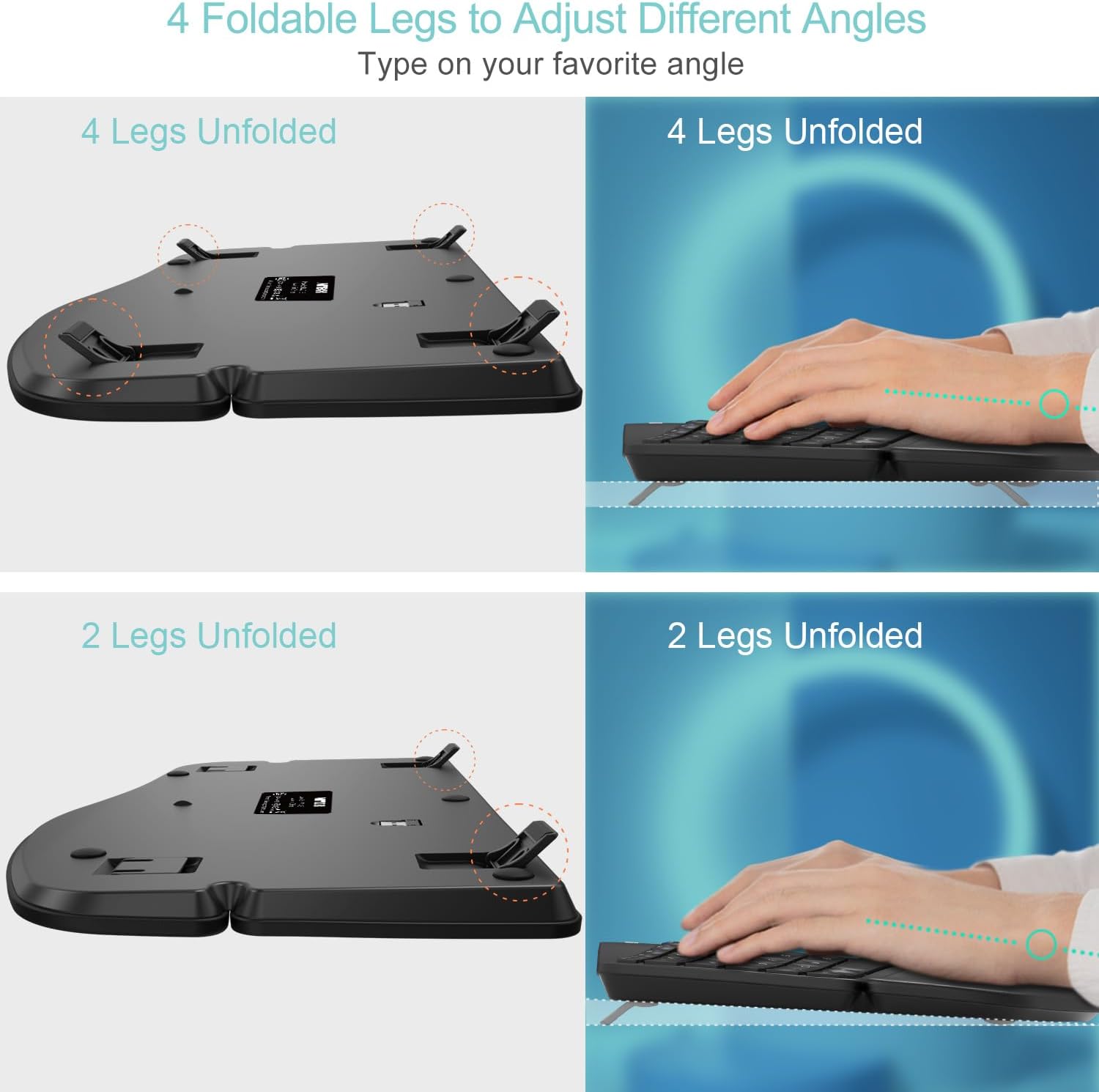
Roli R.'s core ergonomic objection is about height, not width. On the Microsoft board, they explain, "you can angle the 4000 up at the palms, so that the keyboard has a pronounced downward slope", managed with "a separate piece which you attach to the underside of the keyboard, giving it around a 50mm rise height from the desk". Their reading of the Arteck: "The Arteck achieves the lift by putting two small feet at the back, underside of the keyboard which raises it around 20 mm, so you can hardly notice it and my hands are nowhere near as comfy as when I use the 4000."
Now go and look at the fourth listing photo. It is captioned "4 Foldable Legs to Adjust Different Angles", subtitled "Type on your favorite angle", and it shows the underside twice: once with four legs unfolded, once with two. There are two configurations documented by the manufacturer, and the review above describes one of them.
Roli R. knew the front feet were there. Here is what they did with them: "There are feet at the front as well and this is lucky because one of my back feet snapped off and I simply replaced it with one of the front ones, seeing as I won't ever use those." They wrote off half the adjustment range, then cannibalised it for a spare part.
I am not going to tell you the four-leg position would have settled their wrist, because no source here says that and I have not typed on one. What I will say is that the most detailed criticism of this keyboard's ergonomics in the entire sample was formed without trying the other setting Arteck documents in its own photography. If you buy this and the angle feels wrong, flip all four legs out before you write it off. It costs nothing to find out, and it is the first thing I would try.
The snapped foot deserves its own line, mind. That is a small moving plastic part on a keyboard people pick up and move, and on at least one unit it broke.
Backspace Sits Flush Against NumLK. The Photo Tells You the Rest.
Four of the thirteen reviewers fumble keys, and both of the four-star reviews are in that group. Zoom into the photo at the top of this page and you can see most of it coming.
Backspace sits immediately next to NumLK, nothing between them, no size difference to feel for. Which produces exactly the complaint you would predict: "the backspace key is flush with the surrounding keys and I find myself hitting the num lock key way too often for it to be a coincidence". The number pad carries the navigation keys as secondary legends, 7 for Home, 9 for PgUp, 1 for End, 3 for PgDn, 0 for Insert. Roli R. clocked it, noting the Home and End buttons "are doubled up as the '7' and '1' keys respectively", and that the pad "is not raised and is sloped away from the main keys", so "I often have to glance down at the keyboard to use those keys". For a touch-typist that is the whole point gone.
A US reviewer hits the same wall from the other direction: "It does not have dedicated keys for Page Up/Down, Home, or End. You need to hold down the function key and use the corresponding arrow key for those functions." Two people, two countries, same finding, so this is the hardware rather than anyone's muscle memory. They price it very differently, though. For Roli R. it is "cumbersome and time consuming". For the American it is "Not even remotely a deal breaker".
The last one is UK-specific and easy to miss. This is a proper UK ISO board, exactly as it should be: pound sign on 3, euro on 4, the tall L-shaped Enter, an Alt Gr, and a narrow left Shift with the backslash and pipe key sitting between it and Z. All standard. What is not standard is how little that Shift stands out once the rows are bent into an arch, and one UK reviewer, at four stars, put their finger on it: "certain keys are in weird places. Having used a 'normal' keyboard for many years, getting used to having to actually lift my hand to use certain keys (most specifically the SHIFT key on the left side which has the |\ key where the SHIFT should be) is a bit irritating." They close undecided: "I will persevere for now but I may need to look at another option."
Budget an adjustment period. Of those four reviewers, three carried on using it and one was still undecided when they wrote.
Nobody in This Sample Gave It Fewer Than Four Stars. Four Still Had to Contact Support.

Here is the caveat I promised. Amazon's review endpoint would not serve the full set for this listing, so the thirteen reviews above are the cards Amazon chose to display on the product page itself. That is Amazon's relevance ranking, not the thirteen most recent, and it is a shop window: eleven five-star, two four-star, nothing below. The sample averages 4.85. The lifetime average across 1,590 ratings is 4.6.
That gap is the whole point. A 4.6 lifetime average across that many ratings means there are one and two-star reviews sitting on this listing, and I did not get to read a single one of them. So treat everything above as evidence from a filtered window, and treat the absence of complaints inside it as meaningless. It tells you what Amazon promotes. It does not tell you what the average buyer found.
Which makes the next number worth your attention. Even inside a window with no critical reviews in it at all, five of the thirteen reviewers talk about Arteck's customer support, and four of those five are describing something that went wrong with the keyboard. One "did have an issue with it at month 12". One was "impressed by swfit action from support when I had an issue". One "Had a problem and contacted customer services". A US buyer found the battery "was not holding its charge like it used to" after roughly a year. Two of the four were sent or offered a replacement.
Read that back. Nearly a third of Amazon's best thirteen reviews for this keyboard come from people whose unit developed a fault and who are handing over five stars because Arteck sorted it out. That is a real compliment to the support desk and a real question about the hardware, and it is the most useful thing that leaked out of a sample that otherwise tells you nothing was ever wrong.
The 24-month warranty in the listing is visibly doing work, then. The US buyer named it as a reason for buying in the first place: "The 2 year warranty was one of the reasons I purchased this keyboard". Keep your order in your Amazon account, and do not throw the box away in month one.
Buy the Arch, Not the Idea of a Split
This is a cheap way to find out whether an angled, splayed layout settles your hands, and the evidence in the sample, thin and filtered as it is, says that for several people it did. The wrist rest is a proper three-layer build rather than a foam offcut. It is quiet enough for an open-plan office, on the word of two UK reviewers, one of whom says "typing on the keys isn't loud enough to disrupt an open-plan office" and another that you "can hardly hear the keys being pressed". The listing claims six months per charge at two hours a day, and the only long-term account in the sample, from the US, backs the order of magnitude before it went wrong: "it had lasted very long, like 9 months initially".
Buy it if you want the Microsoft Natural shape without the Microsoft price, you have a USB-A port to give up permanently, and you have 25cm of desk depth going spare. Buy it if a 4000 was always a touch too big for your hands, because the sample's one 4000 owner says this is smaller and has large hands.
Do not buy it if you wanted two halves you can separate and place at shoulder width, because this is one shell and it will never be anything else. Do not buy it if you need Bluetooth, whatever three reviewers say. And go in with your eyes open: four of Amazon's thirteen showcased reviewers had something go wrong, a foot snapped off one of them, and you are leaning on a 24-month warranty and a support desk that, in fairness to Arteck, all five reviewers who used it praised.
Against the obvious rivals, briefly and without pretending. The Logitech ERGO K860 is the premium default in this shape, and I have no review data in front of me to weigh it against, so I will not invent a verdict. Against the flat membrane board already on your desk, this keyboard is the entire argument, and it is a cheap argument to settle. Against a true two-piece split, it is not competing at all: different product, different search term, and the thirteen people above are not describing one.
Check today's price on Amazon before you commit, because the whole case for this thing rests on what it costs next to the alternatives.
Arteck Split Ergonomic Keyboard with Cushioned Wrist and Palm Rest
A one-piece arched split keyboard with a three-layer memory foam wrist rest, four foldable legs for angle adjustment, a 2.4G nano USB receiver and a 24-month warranty. The cheap way to find out whether a splayed layout settles your wrists.