Eightree Sells This as a Mini Smart Plug for a Double Socket UK Homes Can Take. The Proof Shot Is an Extension Lead.
Eightree promises this one will not block your other socket. The photo they use to prove it is staged on an extension lead, not a wall socket. Two reviewers took it to a real UK twin socket and reported back on the switch, and one of them also flagged the compromise that only shows up once you fit two side by side.
- The Mini Smart Plug for a Double Socket UK Promise, and the Photo Meant to Prove It
- Nobody in These Reviews Writes 'Double Socket'. Two Write 'Twin', and They Are the Two to Read.
- Fit Two Side by Side and the On/Off Button Goes Where You Cannot Reach It
- Ten of the Hundred Mention Size. Nine Like It. One Calls It Bulky.
- 2.4GHz Only, a Bluetooth Shortcut, and the Android Version That Ended It for One Buyer
- The Twelve One-Star Reviews Split Four Ways
- The App Puts a Pound Figure on the Screen, With a Few Minutes' Lag
- Teckin, Aoycocr and Amazon Basics: What These Buyers Switched From
- Four Plugs, One Real Compromise
Every UK double socket has the same weakness. The two outlets sit close enough together that one fat plug top holds both of them hostage, and on a switched twin socket it will often sit over the rocker switch too. Put a chunky smart plug in the left-hand side and you have quietly lost the right-hand side. That one annoyance is the entire reason people search for a mini smart plug for a double socket UK sockets can actually accommodate.
Eightree has clearly heard the complaint. The fifth bullet on this listing makes the promise in as many words, and one of the nine product images is given over entirely to proving it. Look closely at that image, though, and the thing it proves the claim on is an extension lead. Not a wall socket. So we read all nine images and all 100 most-recent reviews to work out whether the claim holds up on a real twin socket, and it turns out two buyers had already put it there and reported back.
The Mini Smart Plug for a Double Socket UK Promise, and the Photo Meant to Prove It
The listing's fifth bullet is the reason this product turns up for the search at all. Word for word, it reads: "Reliable & Compact: This smart Wi-Fi plug combines a slim mini design that won't block the UK socket switch with an upgraded setup process."
Read that carefully, because the wording is narrower than it first appears. The promise Eightree actually makes is that the plug will not block the UK socket switch. It does not say it will leave the second outlet free. Those are two different claims, and on a switched twin socket they come apart.
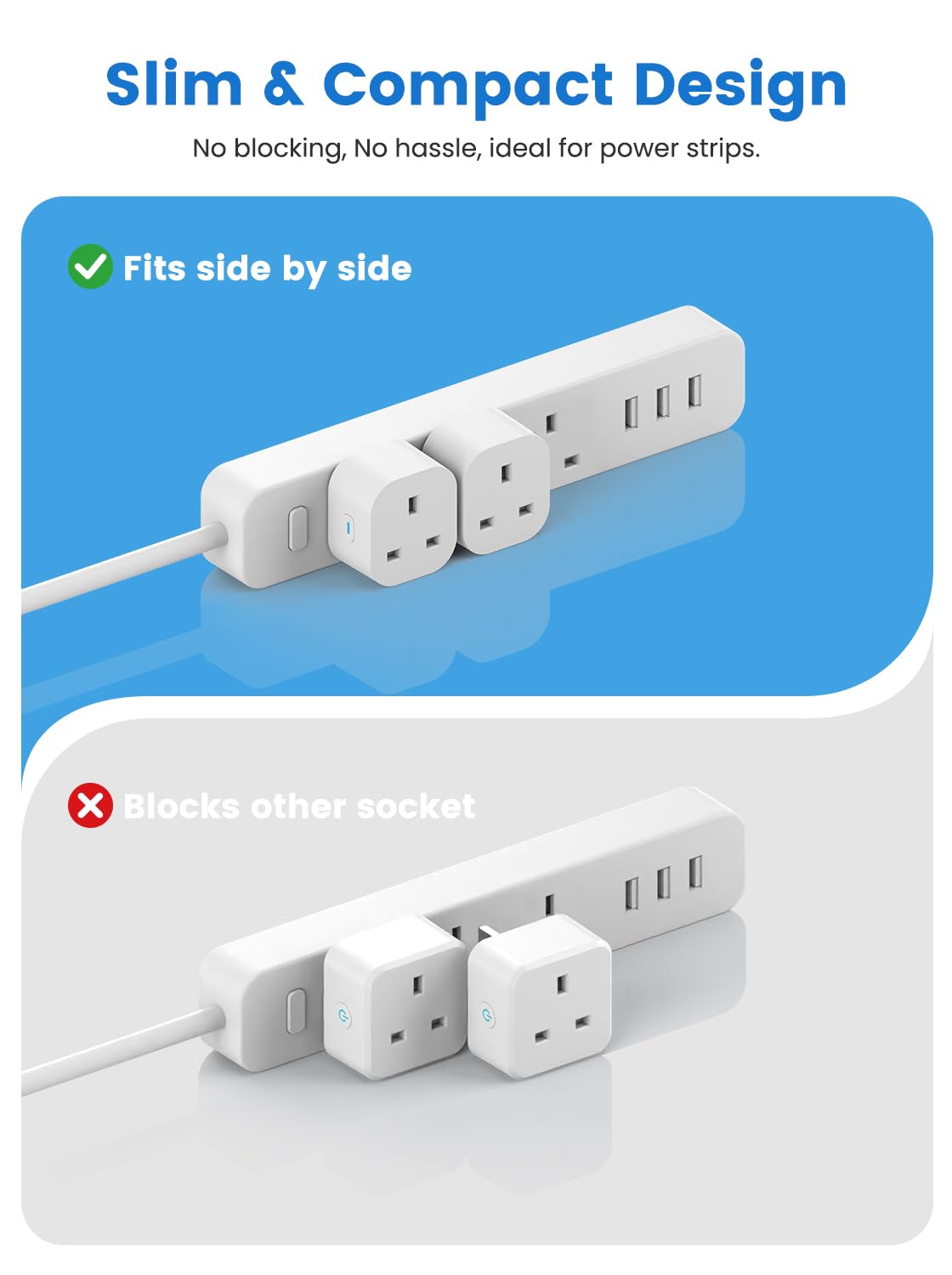
The third product image goes further than the bullet does. It is headed Slim & Compact Design, subtitled No blocking, No hassle, ideal for power strips, and it runs a straight comparison: a green tick over Fits side by side, a red cross over Blocks other socket. The tick panel shows two of these plugs sitting happily next to each other. The cross panel shows fatter rivals doing what fat plugs do.
Here is the part worth noticing. Both panels are staged on a power strip, an extension lead with its outlets in a row. The subtitle says so outright. A UK double wall socket is not laid out like that, and Eightree never photographs one with two plugs in it. Three of the nine images do show an actual UK twin wall socket, the second, fourth and fifth, and in all three a single plug is fitted with the neighbouring outlet left empty. To be fair to Eightree, those three do back up the narrower bullet-point claim: in the second and fourth you can clearly see the plug sitting clear of the rocker switches, which is exactly what the bullet promised. What no image in the set shows is two of them sharing one double socket.
There is also no measurement anywhere. We checked the listing text and all nine images: not one millimetre figure, and no amperage or wattage rating either. The manufacturer asserts the fit, illustrates it on the wrong kind of socket, and never gives you a number you could hold it to.
Nobody in These Reviews Writes 'Double Socket'. Two Write 'Twin', and They Are the Two to Read.
We searched all 100 most-recent reviews for the vocabulary of this problem. The word mini appears in none of them, and slim only once, tucked inside one buyer's Pretty slimline. The word double appears once too, and it is a buyer saying they no longer need to double check that everything is off. On its face, that looks like nobody is discussing the footprint at all.
They are. They just use the British word for it: twin. Two reviewers use it, both rated five stars, and between them they answer the question the manufacturer dodged.
The first is titled "No wider than a regular 13A plug top." The body calls it the only smart plug the buyer has found that "doesn't overhang the width of a normal socket", and says every other one they have bought either refuses to let two sit side-by-side on a four-way board or covers the switch on a twin switched wall socket.
The second is a long, unusually technical review from a buyer who identifies the unit as the ET32 model, distinguished by the elongated switch button on its side, an upgrade on the earlier ET31 with the round switch. Top of their list of good points: "Narrow as a BS 1363 13A plug so you can see and access the switches on standard twin socket outlet. Plus plug them into adjacent sockets on a multi distribution strip."
Both are using a standard UK plug top as a ruler, not quoting a rating, and neither the listing nor any image states what this plug is actually rated to carry. But as an answer to the search that brought you here, that is about as direct as reviewer evidence gets. Be precise about what it proves, though. Both confirm the switch: the plug is narrow enough that a twin socket's rockers stay visible and reachable. Neither describes two of these sharing one wall socket. Where they do describe two side by side, the first on a four-way plugboard and the second on a multi distribution strip, they are talking about extension leads, the same staging Eightree chose. The wall-socket conclusion follows from the width rather than from anyone's photograph: if it really is no wider than a standard plug top, it takes up no more of a double socket than the plug it replaces. Two more back that up without naming a wall socket, one noting the compact design "means it doesn't block other sockets, which is a big plus", another that "They are so small you could put 4 in a 4 way trailing socket."
Fit Two Side by Side and the On/Off Button Goes Where You Cannot Reach It
The same detailed reviewer who confirmed the twin-socket fit also filed the one complaint that matters most to anyone buying for exactly this reason. It is worth quoting at length, because they are the only reviewer in the hundred to raise it:
"why does this brand and most other similar ones put the manual ON/OFF button on the SIDE of the plug which can be obscured by another plug next to it when used in multiple 4way extension leads. The TOP of the plug would be more generally accessible and also not be accidentally pressed when gripping the plug by its sides to remove it."
So the narrow body wins you the neighbouring outlet, and then the narrowness puts the manual button in the gap between two plugs. Note the precise scope: this buyer describes the problem on four-way extension leads, where plugs sit shoulder to shoulder. On a wall twin socket, where the outlets are set further apart, they report the opposite result, that you can still see and reach the switches.
They also name a rival that solves it. "Amazon Basics Smart plug is just as compact and DOES have the manual switch on the top side. IT CAN BE DONE." That is a fair hit. If you are filling a four-gang extension lead and you want to keep manual control of each plug, that button placement is a real reason to look elsewhere.
For most buyers it will not bite, because the manual button is the backup. The app, a schedule or a voice command is how these get used day to day, and none of those care where the button sits.
Ten of the Hundred Mention Size. Nine Like It. One Calls It Bulky.
Since the footprint is the whole proposition, here is the full tally rather than a cherry-picked quote. Of the 100 most-recent reviews, 10 make a substantive comment about the plug's physical size. Nine are positive, one is not. The other 90 do not raise size at all, which is worth saying plainly: this is a minority topic, and the people who bring it up are mostly the people who bought the plug for that reason in the first place.
The four already covered address fitting alongside another plug. The remaining positives are broader. One buyer says they "Respond much better than the more expensive brands and take 2x less space". Another titles their review Small and fully functional and notes the "small form factor ensures works well in tight spaces". A buyer with eight of them around the house, used for awkward light switches and Christmas lighting, calls them "Small plugs so not taking up much room". A fourth simply says they are "compact and seem to be well made", and a fifth calls them "Pretty slimline".
The dissent comes from a four-star reviewer who otherwise liked it, praised the energy cost calculation and uses it to cut power to an e-bike battery after 30 minutes. Their one reservation: "The only thing I don't like is that the device is a bit bulky." One voice against nine, but it is there, and it is a reminder that compact is being judged against whatever plug that person owned before.
2.4GHz Only, a Bluetooth Shortcut, and the Android Version That Ended It for One Buyer
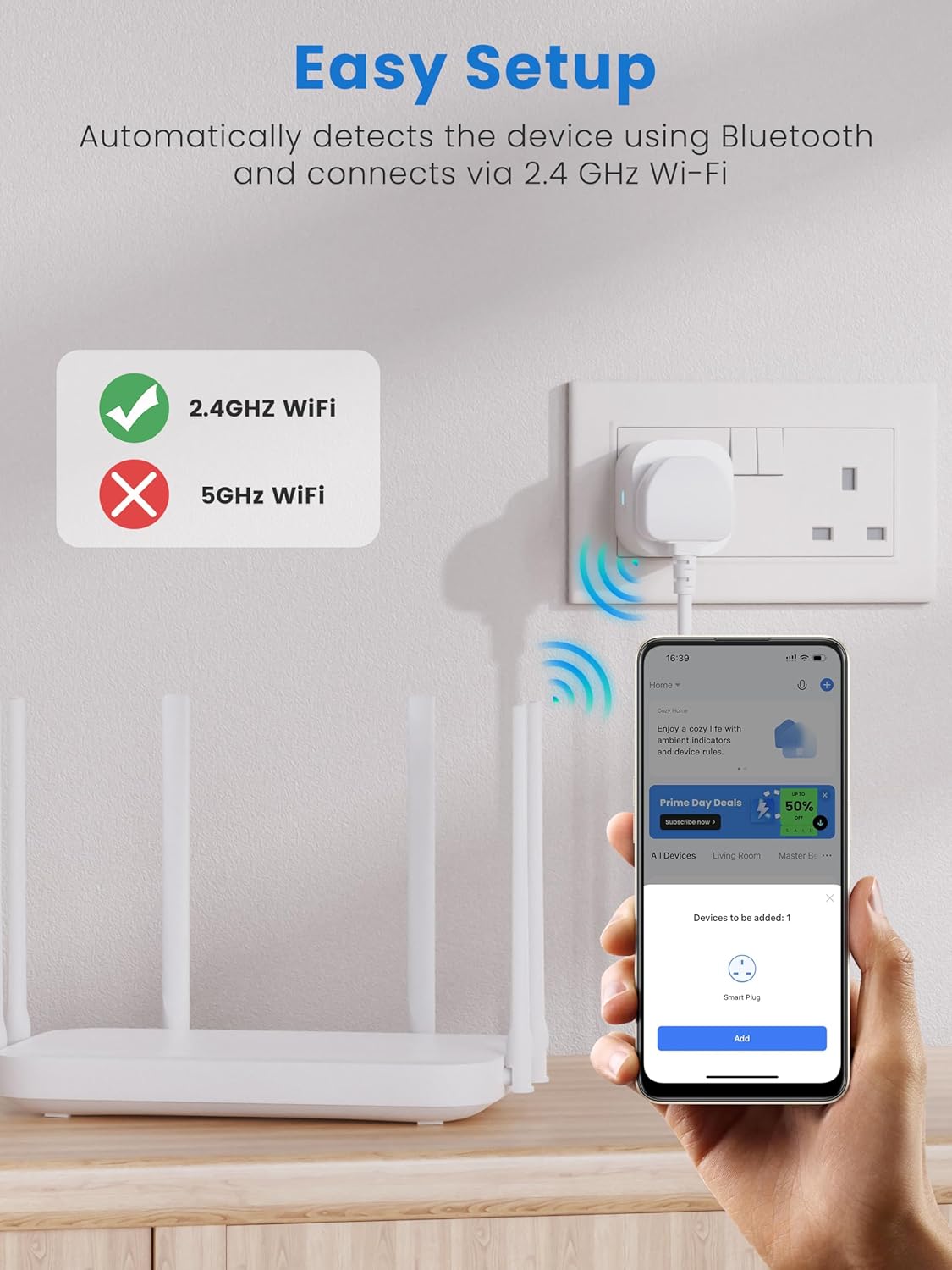
Setup is where this product splits its audience hardest, so be clear on the requirement before you order. The fourth product image states it without ambiguity: a green tick beside 2.4GHZ WiFi, a red cross beside 5GHz WiFi, under the heading Easy Setup and the line Automatically detects the device using Bluetooth and connects via 2.4 GHz Wi-Fi. Your phone pairs over Bluetooth to hand the plug your network details, but the plug itself will only join a 2.4GHz network. The product title carries the same 2.4Ghz note if you read to the end of it.
For most buyers this is a non-event. Across the 100 reviews, 52 reach for words like easy, simple or straightforward, and 34 of those pair that word with setting up or installing the plug. One five-star buyer had the two they ordered running "within 5 minutes".
For a minority it is the whole problem, and a happy customer supplies the fix. Working around a Virgin router, they wrote that they "found it was easiest to enable both 2.4GHz and 5GHz and use the 2.4GHz on my phone to run the app to connect to this. Can always switch back to 5GHz afterwards." If your router publishes one combined network name, that is the manoeuvre to try before you give up.
Some could not get there. One buyer gave up after two hours: "Absolute nightmare to link to Google home or Alexa. Gave up after 2 hours. Back in the box. Avoid". And one hit a requirement that appears nowhere in the listing at all, returning them because "the phone's operating system required android 12 or more, mine is only 10+". If you are running an older Android phone, check that before you buy, because Eightree does not tell you.
Two one-star reviewers report the app pushing a paid tier, one calling it "very expensive £49 a year". A five-star buyer flatly contradicts them: "No sub needed, just install the app." The likeliest reading is an optional cloud upsell that can be declined, but two buyers clearly did not read it that way.
Alexa comes up in 22 of the 100 reviews and the split is telling: 18 of those are five-star, 4 are one-star. When the pairing takes, people love it. When it does not, they do not stay to argue.
The Twelve One-Star Reviews Split Four Ways

This is a polarised product. Of the 100 most-recent reviews, 81 are five-star and 12 are one-star, with almost nothing in between: 4 four-star, 1 three-star, 2 two-star. A block that size deserves reading rather than averaging, so we read all 12 in full. They fall into four groups.
Five never got it working. These are the setup and pairing failures covered above, including the Android version mismatch and the two subscription complaints.
Three worked, then stopped. One reports it running well for around six months before the sockets "have started quickly shutting off and back on again with no prompt", which for them meant a TV box rebooting mid-programme. One wrote "Stopped working today. 11 months old." A third got two years out of it with only a small LED light attached, and was not impressed.
Two report a thermal or electrical incident. One says the plug "gave off really bad smell and melted the appliance plug that was plugged in to it". The other raises a concern about the plug's fuse behaviour under load. We are not in a position to assess the electrical reasoning in either report, and two incidents in 100 is not a pattern, but on a mains device left plugged in unattended they are the reviews we would want a buyer to have seen. The three-star reviewer is adjacent to this group: they had two separate units fail, praised the manufacturer for replacing the first, then returned the lot rather than risk it.
Two are not really about the product. One says only "Not good." with no detail. The other is titled Nice Quality and explains the buyer does not own a smartphone.
Those four groups account for all 12. It is also where the missing load rating starts to matter. Reviewers in this sample have these plugs running portable oil radiators, an e-bike battery charger and a TV box, and neither the listing text nor any of the nine images states a maximum wattage or amperage. If you are planning to put a heater on one, that absence is worth a moment's thought.
Set against that, 10 of the 100 reviewers volunteer that they have bought more, are buying more, or bought them again. Two more households, counted separately, report running eight of them.
The App Puts a Pound Figure on the Screen, With a Few Minutes' Lag
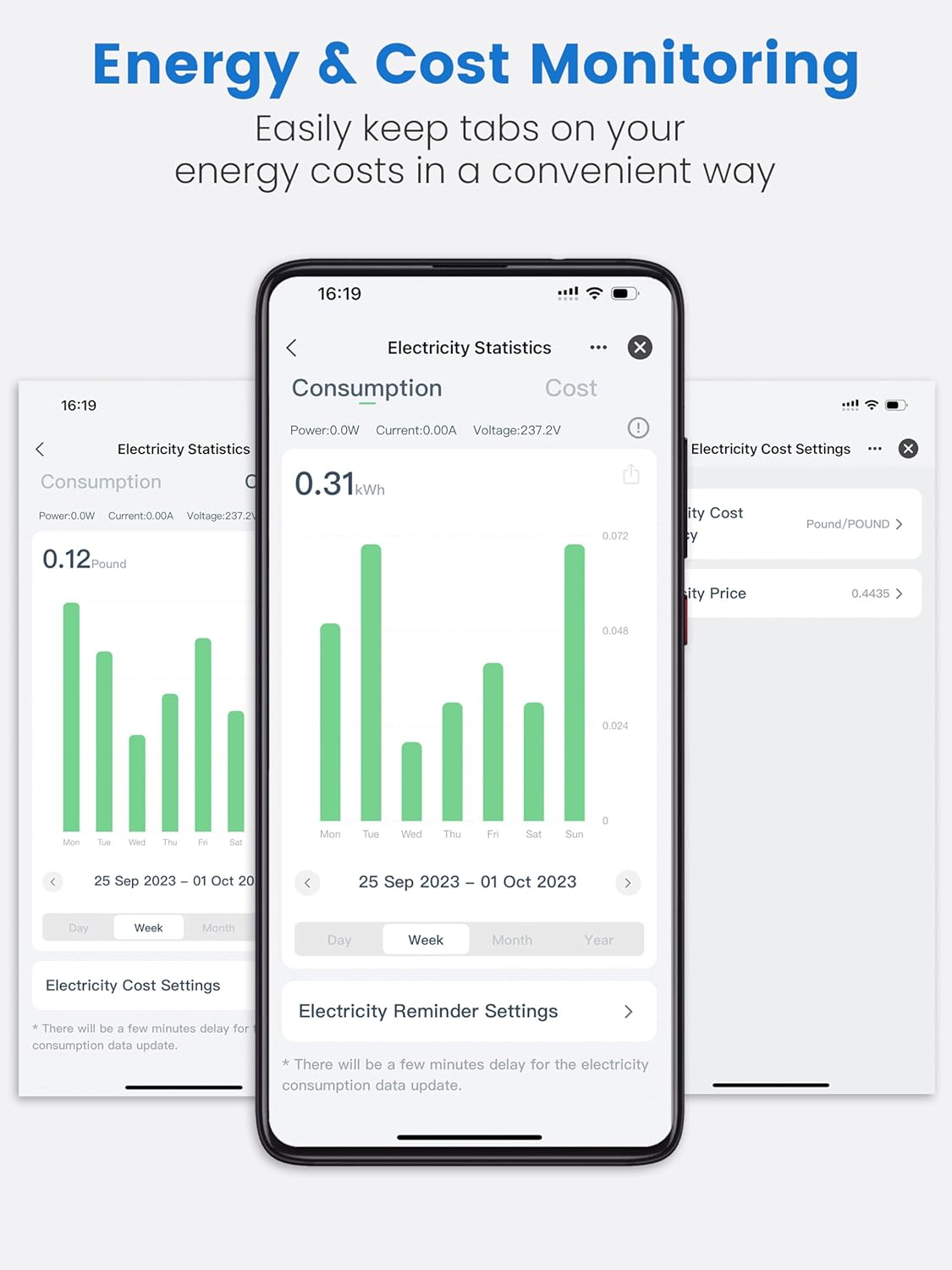
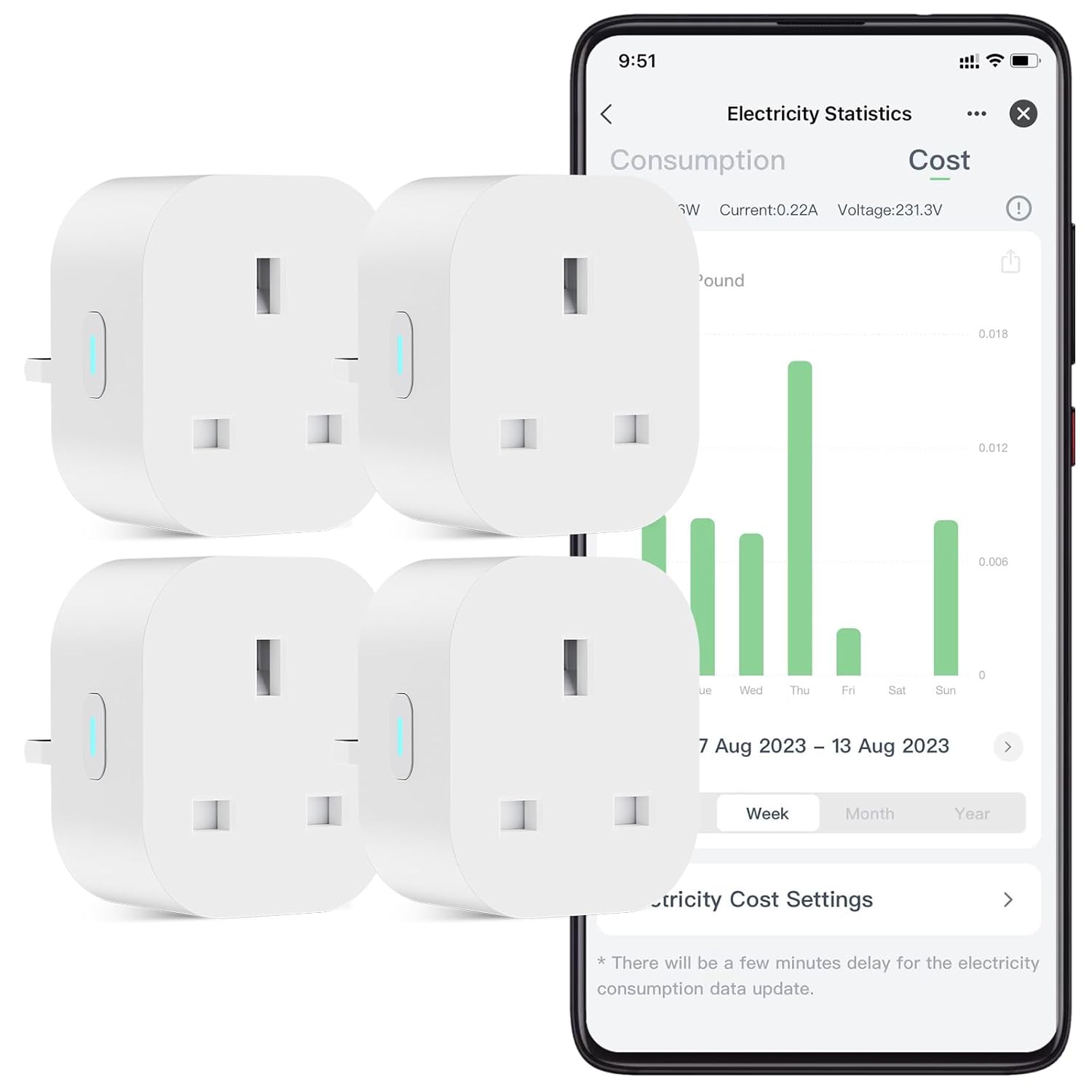
Energy monitoring is the feature that separates this from a basic timer plug, and the listing images show what you actually get rather than making you guess. The seventh image runs three Smart Life screens: a Consumption tab reading 0.31 kWh for the week, a Cost tab reading 0.12 Pound, a live line showing power, current and voltage, and an Electricity Cost Settings page where the currency is set to Pound and you type in your own unit price. The first image shows the same dashboard live, with a real current and voltage reading next to a weekly cost chart.
Two things follow. Sterling is a setting you select rather than a currency you are stuck converting from, and Eightree's own screenshots show it selected. And the figure is only as good as the tariff you enter, because you are supplying the rate yourself. One buyer describes exactly that: you "put in your electric cost per Kw and it not only tells you your usage but also calculates the cost".
Both energy images carry the same small print, and it is a fair caveat to know in advance: There will be a few minutes delay for the electricity consumption data update. This is not a live-to-the-second meter.
Eight of the 100 reviews engage with the energy and cost side. The most striking is a household that put these on portable oil radiators and on lights they use regularly, and saw a winter bill drop from over £1000 a month to £800. Read that one with care though: they also switched to those portable radiators as part of the same change, so the plugs are one variable among two, not the sole cause of a £200 swing.
Teckin, Aoycocr and Amazon Basics: What These Buyers Switched From
Only two reviewers in the hundred name the plug they moved off, but both are useful. One switched from Teckin after "massive problems" connecting them, and found these auto-connected through Smart Life in seconds, while noting they can be "slightly slower to activate than other brands I have had" over Alexa. The other moved off Aoycocr, which they describe as wider, after five years and a physical breakage. That same reviewer rates Amazon Basics as equally compact with a better-placed button, the only rival named in this sample as beating it on anything.
Against a TP-Link Tapo, the obvious brand-name comparison in this aisle, the split is straightforward. Tapo is the safer brand-name buy with the more polished app, and it costs what a brand name costs. This is a four-pack from a smaller name that lives or dies on two things: the narrow body, which the reviews support, and the Smart Life ecosystem, which is either fine or a fortnight of your life depending on your router.
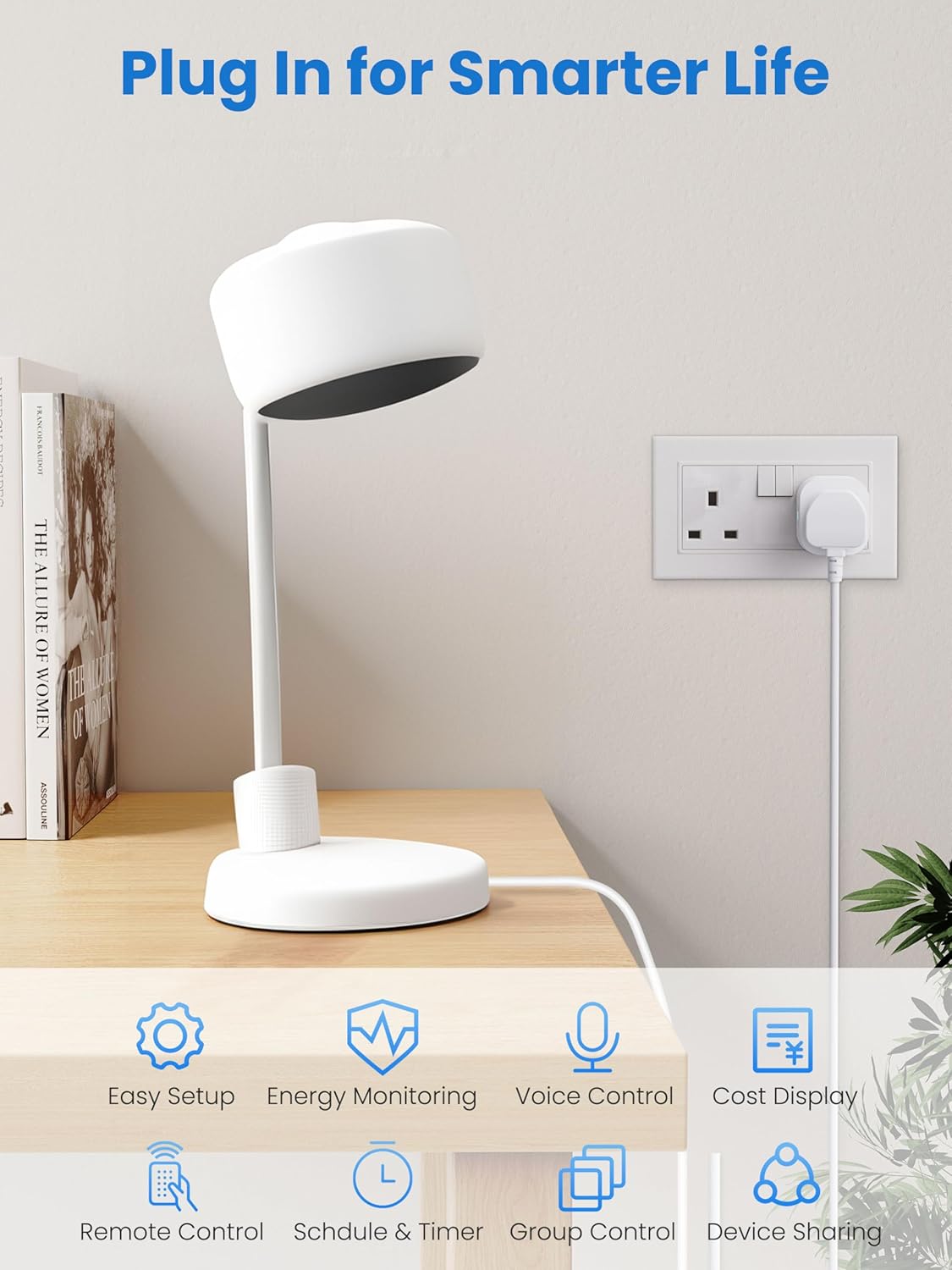
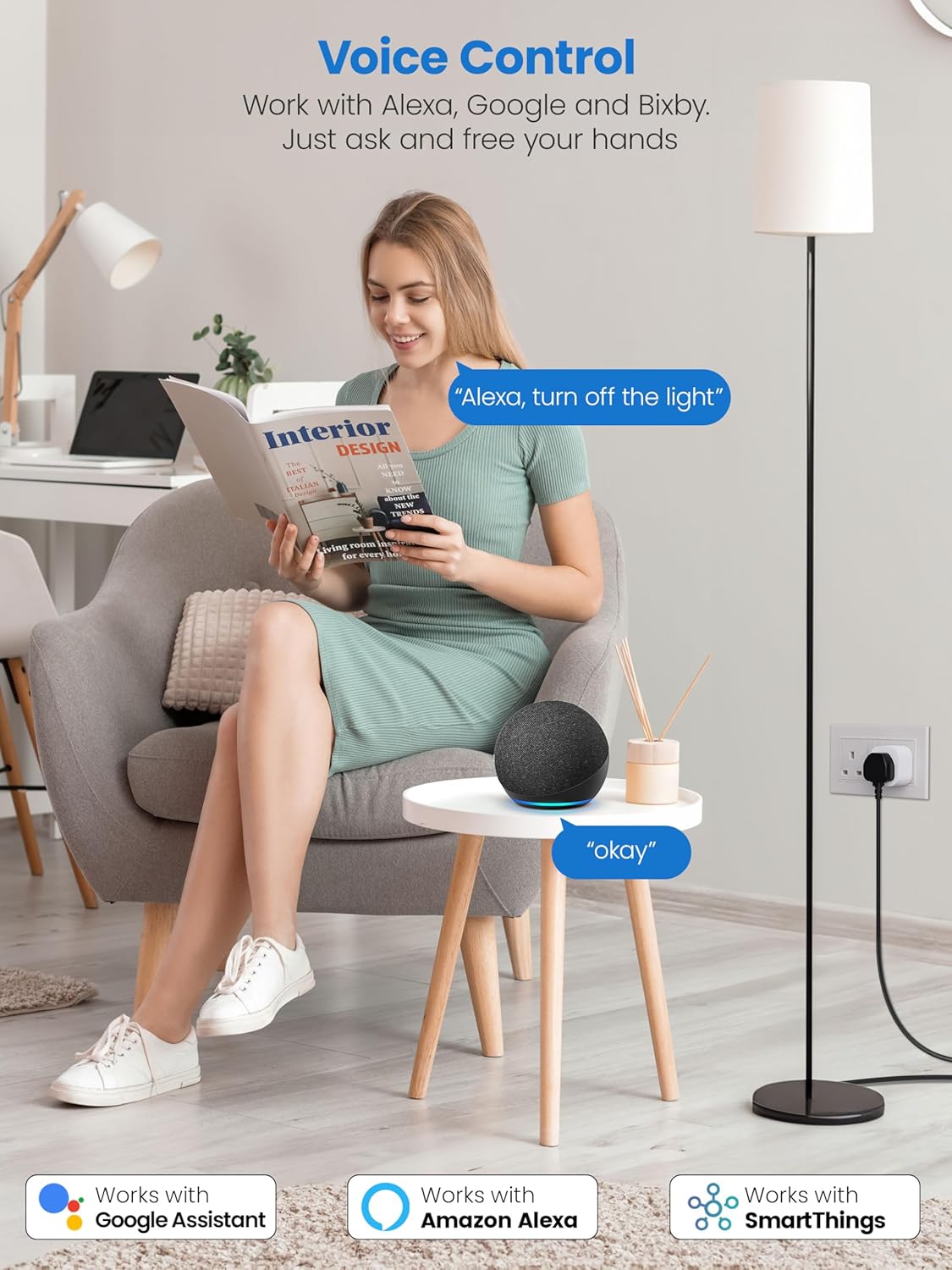
On compatibility, the images claim more than the text bullets do. The bullets name Alexa and Google Home. The fifth image is headed Voice Control, says Work with Alexa, Google and Bixby, and carries three badges: Works with Google Assistant, Works with Amazon Alexa and Works with SmartThings. A four-star reviewer confirms the Samsung end of that, writing that it "also works with Samsung Bixby". The second image adds two more capabilities as icons, Group Control and Device Sharing, neither of which the written listing mentions.
Worth remembering when you weigh the value: this is the four-pack, so whatever you pay covers four plugs rather than one. Check today's price on Amazon before comparing it against a single-unit rival.
Four Plugs, One Real Compromise
On the question that brought you here, the answer is a qualified yes, with a caveat the manufacturer never shows you. Two UK reviewers using a twin switched wall socket confirm this clears the rocker switch, and one of them measures it against a BS 1363 plug top and finds no overhang. That is the load-bearing fact: a plug no wider than the one already in your socket cannot steal the outlet beside it. What nobody photographs, Eightree included, is two of them in the same double socket. Two more reviewers report them sitting side by side, but on extension leads, one reckoning four would fit a single four-way trailing socket. It is still better evidence than the listing's own comparison image, which is staged on a power strip while every photograph of a real UK double socket in the set has the second outlet sitting empty.
The caveat is the side-mounted manual button, which the narrow body pushes into the gap between two plugs when they are crammed together on an extension lead. If you want physical control of each plug in a four-gang board, look at the top-button alternatives instead.
Buy it if you are trying to get a smart plug into a switched double socket without surrendering the other half, if you want per-plug running costs in pounds, and if you are on a 2.4GHz network or willing to split your bands for ten minutes to get it paired. Four in a box makes kitting out a whole room realistic rather than aspirational.
Skip it if you are on an older Android phone, if you need a plug for a high-draw appliance and want a printed load rating before you commit, or if the twelve one-star reviews in a hundred read as too much risk for a device you will leave in the wall unattended. Our rating lands at 4.1 out of 5: the size claim holds up better than the manufacturer proved it, and the failure tail is real enough to keep it below the lifetime average.
EIGHTREE Mini Smart Plug, 4 Pack
A narrow-bodied smart plug with energy and cost tracking in the Smart Life app, Alexa and Google voice control, and a body slim enough to leave the neighbouring socket usable. Four in a box.