Anker States the Gigabit Speed of This Docking Station With Ethernet Port UK Buyers Keep Choosing in a Photo, Not the Description
You searched for the ethernet port. The 100 most recent owners barely raise it. What they argue about instead is screens, and that is where this Anker dock draws a hard line.
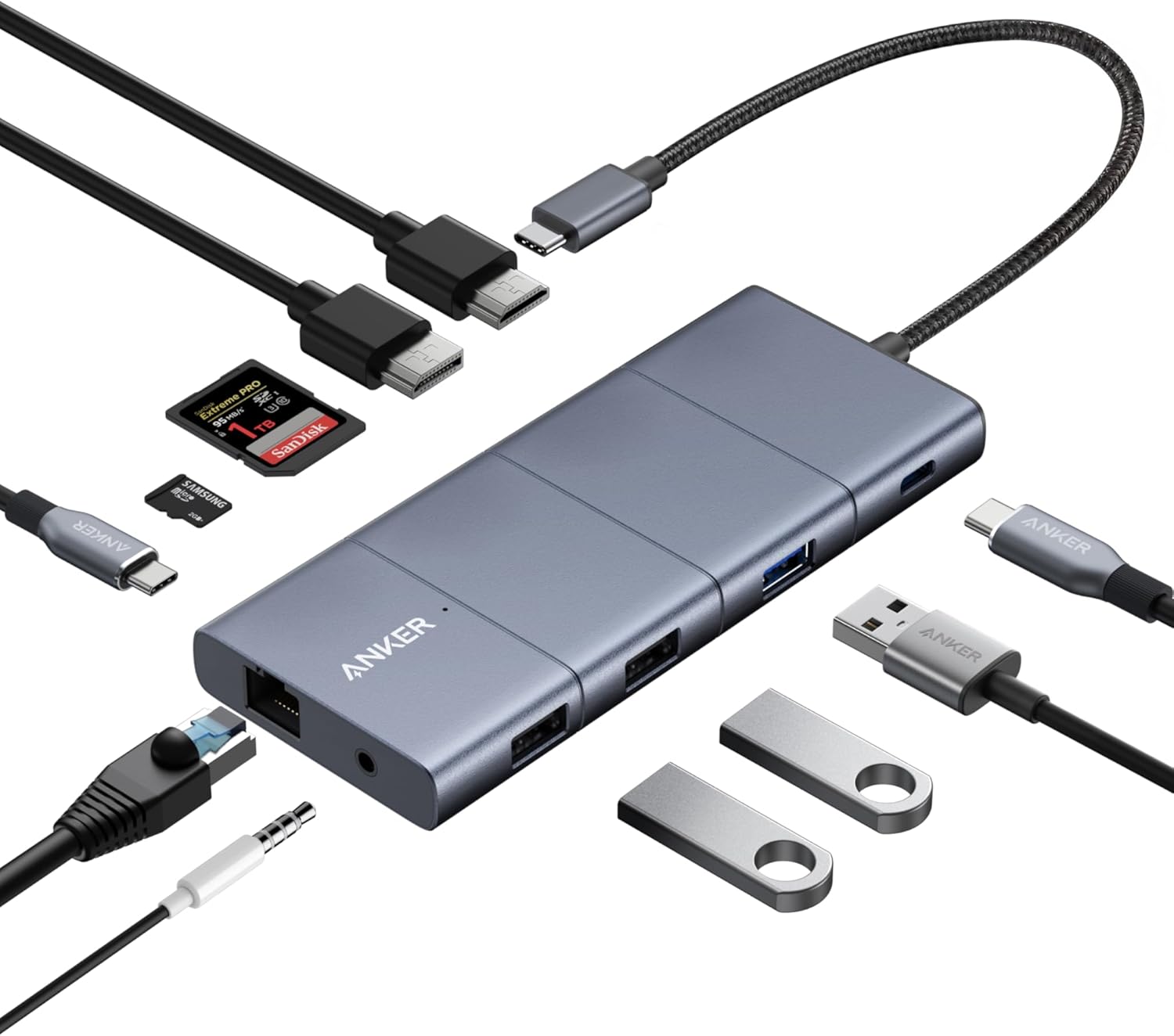
- The Docking Station With Ethernet Port UK Buyers Keep Choosing Leaves Its Speed Out of the Text
- Only 8 of the 100 Most Recent Owners Mention the Network Side at All
- What They Argue About Instead: Screens
- Two 4K Monitors Is the Line This Dock Will Not Cross
- Three Ports That Do Not Do What Buyers Assume
- Mac Users Get Their Own Row in Anker's Table
- 85W Out, and the Slow Charging Warning Anker Tells You to Expect
- Where the 26 Critical Reviews Land
- Against the Dock You Would Otherwise Buy
Search for a dock with a wired network socket and you land on a wall of near-identical grey rectangles. Anker's 565 11-in-1 is the model that keeps surfacing, and its listing is oddly quiet about the one detail you came for: six bullet points, a single mention of “an Ethernet port”, and no speed attached to it anywhere in the text. The description field on the page is empty.
The figure is published, though. It sits on one of the listing photos: Ethernet, 1 Gbps. The same photo settles the display ceiling and the charging input. Anker put the spec sheet in the pictures and left the text vague.
Then there are the reviews. We read the 100 most recent, every one of them from a UK buyer, and the surprise is not what they complain about. It is what they never bring up.
The Docking Station With Ethernet Port UK Buyers Keep Choosing Leaves Its Speed Out of the Text
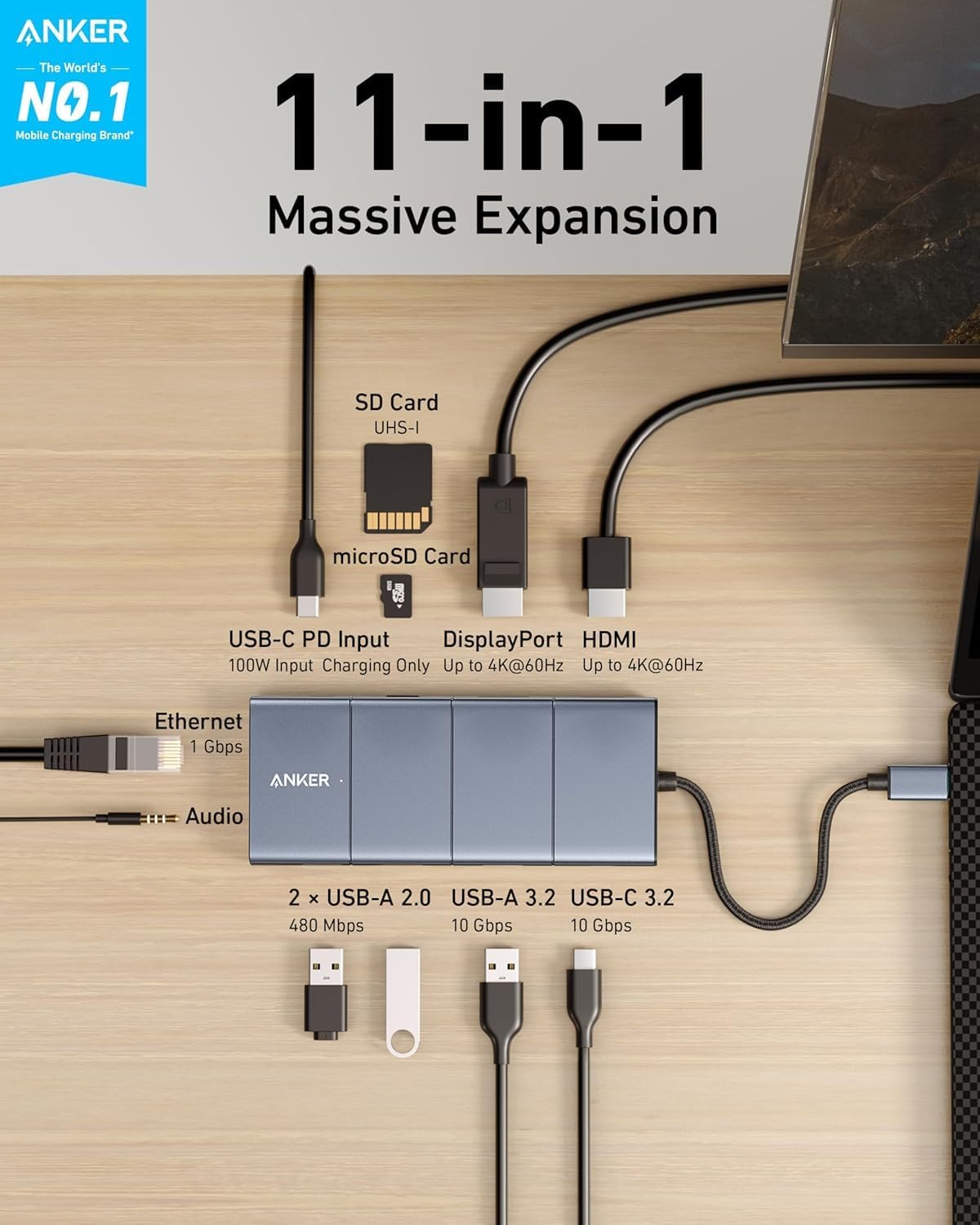
Anker's listing gives you six bullet points. The first runs through all eleven connections and mentions “an Ethernet port” without attaching a number to it. The description field is empty. Shopping on text alone, you finish the page knowing there is a network socket and nothing about what it does.
The second listing image answers it in three words: Ethernet, 1 Gbps. That is full gigabit, and the practical read is simple: unless you are on a full-gigabit fibre package, your line runs out of speed before this port does. The same image labels the rest of the board, and it is worth the ten seconds it takes to read: 10 Gbps on the USB-C 3.2 and USB-A 3.2 ports, 480 Mbps on the two USB-A 2.0 ports, UHS-I on the SD and microSD slots, 100W in on the USB-C power input, and up to 4K at 60Hz on both HDMI and DisplayPort.
Two owners go past a passing mention. One buyer running an ASUS Zenbook S 13 under Linux reports that it “Instantly worked passing power, USB keyboard/mouse, gigabit ethernet, and card reader”. Another goes further and names the silicon: “It using Realtek ethernet chipset”, adding that it “Seems to works ok”. That is the deepest scrutiny the network port gets anywhere in the recent reviews.
Only 8 of the 100 Most Recent Owners Mention the Network Side at All
That absence is the finding which reframes the whole purchase. We went through all 100 of the most recent UK reviews and checked every one for any reference to the wired network: Ethernet, LAN, network, internet, even the abbreviation “e/net”. Eight came back. Search for the word “ethernet” alone and you find only four.
Of those eight, five are positive. One describes a “LAN connection” on a work-from-home setup that “Works perfectly”. One confirms gigabit worked on first plug-in. One names the Realtek chipset and says it seems fine. One lists “PD, USB-C, Ethernet” among the dock's good connection options. One says the hub runs “two monitors, usb devices and network connection with aplomb”. A sixth mentions the port only in passing while grumbling about the price.
The last two are negative. A two-star reviewer whose HDMI feed kept dropping adds that “The ethernet also kept cutting out”. A one-star reviewer had a unit where nothing worked, network included. So: five good, one neutral, two bad, out of a hundred.
Nobody in the hundred posts a speed test. Nobody weighs it against a USB dongle or the socket on their router. If the Ethernet port is why you are here, the crowd will not settle it for you, and that is worth knowing before you read a page of five-star reviews and assume they are about the thing you care about. The port works for almost everyone who mentions it, Anker says it runs at 1 Gbps, and the owners have moved on to arguing about something else entirely.
What They Argue About Instead: Screens
Set those eight network mentions against this. Twenty-eight of the 100 reviews mention a monitor, a screen or a display. Twenty use the word “monitor” specifically. Fourteen name HDMI. Whatever brought these buyers to the listing, what they came back to write about was what happened when they plugged a second screen in.
Plenty of it is good. One review lists a live setup of a 34-inch 1440p monitor on DisplayPort, a 27-inch 4K monitor on HDMI, a wireless keyboard and mouse, a wireless headset, a webcam and the laptop power supply, all running at once. Another calls dual monitor support flawless with sharp 4K output. A third connected a Samsung Galaxy Tab S10+ to a TV over HDMI on holiday and found the video output stable while the tablet charged.
But the display side is also where the sharpest complaints sit, and the cause is a limit Anker publishes and buyers keep missing.
Two 4K Monitors Is the Line This Dock Will Not Cross
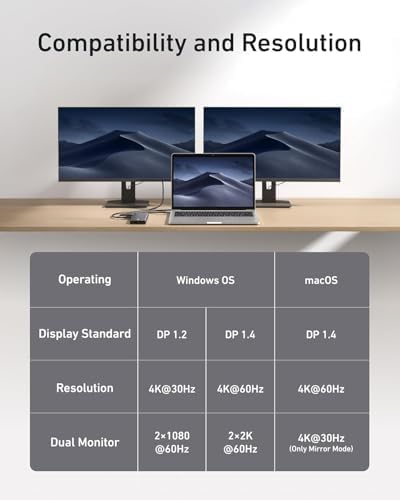
The sixth listing image is a plain compatibility table, and it is the most useful thing on the page. It splits the dock's video output three ways.
- Windows laptop on DisplayPort 1.2: 4K at 30Hz on one screen, or two screens at 1080p and 60Hz.
- Windows laptop on DisplayPort 1.4: 4K at 60Hz on one screen, or two screens at 2K and 60Hz.
- macOS: 4K at 60Hz on one screen, or 4K at 30Hz across two in mirror mode only.
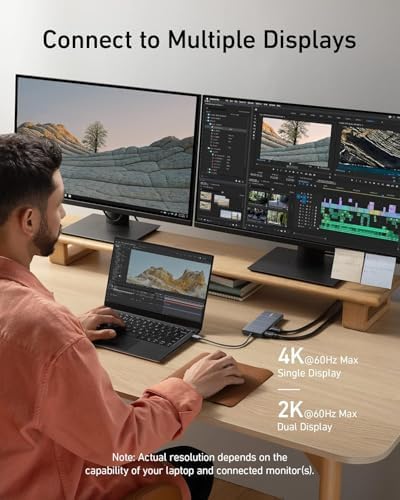
Read that middle row twice, because it is the one that catches people. The best this dock manages across two monitors is 2K each. Not 4K each. A separate listing image states the same ceiling more bluntly: 4K at 60Hz maximum on a single display, 2K at 60Hz maximum on dual, with actual resolution depending on your laptop and monitors.
Now the complaints make sense. A three-star reviewer bought it “to provide two 4k HDMI outputs” and could not get both running at 4K. Another three-star review is a single line: “Doesn't support two 4k monitors at all. Disappointing”. Both are accurate descriptions of a product behaving exactly as its own spec table says it will. A four-star owner on a Thinkpad L14 gen1 reports “only give 4K30 on my machine”, which matches the DisplayPort 1.2 row, though he adds that the same laptop gives him 4K60 through a standalone USB-C to HDMI cable.
To be fair to Anker, the dual-screen limit is in the text too, in the third bullet, worded as “up to 2K at 60Hz with a DP 1.4 laptop or 1080p at 60Hz with a DP 1.2 laptop”. It is there. It is just parked in the middle of a bullet that opens by promising crystal clear streaming, and the picture says it far more clearly than the sentence does.
Three Ports That Do Not Do What Buyers Assume
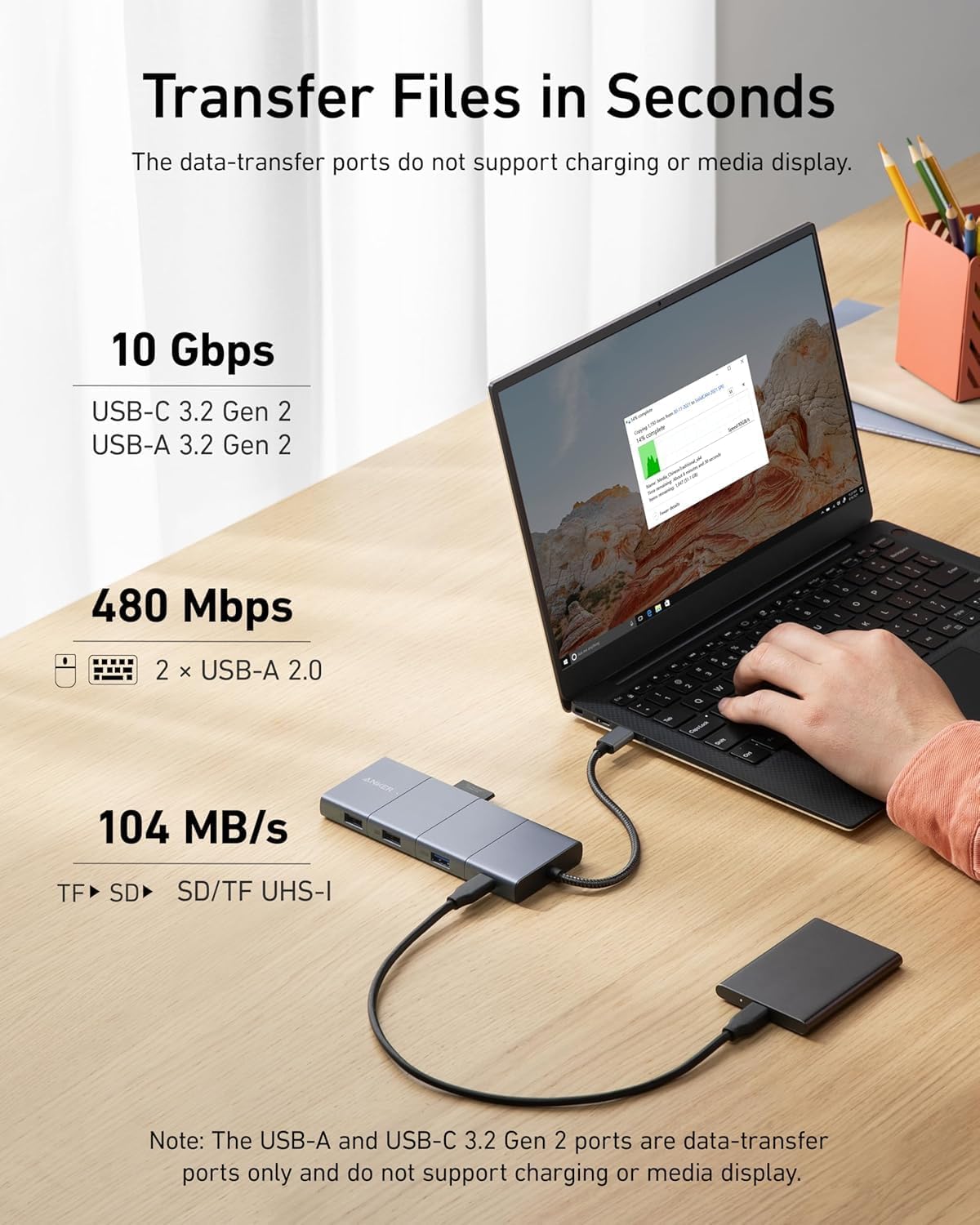
The other cluster of one and two-star reviews comes from people expecting a port to do a job it was never wired for. All three restrictions are spelled out on the listing, and none of them are obvious from looking at the unit.
- The USB-C 3.2 and USB-A 3.2 ports are data only. The transfer-speed image ends with a flat note: the USB-A and USB-C 3.2 Gen 2 ports are data-transfer ports only and do not support charging or media display.
- The USB-C PD port is the mirror of that. The port map labels it charging only, and it takes power in. It will not push video out or move files.
- Video leaves the dock through HDMI or DisplayPort, full stop. The listing's last bullet says it outright: “The hub only supports image output via the HDMI and DisplayPort ports. Image output via the USB-C ports is not possible.”
That accounts for several of the angriest reviews on the page. One buyer wanted it to “connect my laptop to my monitor via usb-c to HDMI”, could not, and returned it, writing that “the product description made no mention of the fact that this adapter couldn't do that”. That final bullet does mention it. Another plugged a Thunderbolt display and a charging cable into the USB-C charging port, got no output on a Dell 4K monitor, and called it disappointing for display output. Same misunderstanding, different angle.
What the data ports do deliver is quick. The listing image puts the USB-C and USB-A 3.2 Gen 2 ports at 10 Gbps and the card slots at 104 MB/s, and the reviews bear that out: one owner who moves photos between a camera and a phone over SD and USB-C says transfer speeds were much faster than the cheaper hub it replaced, and another singles out the card reader as better than expected.
Mac Users Get Their Own Row in Anker's Table
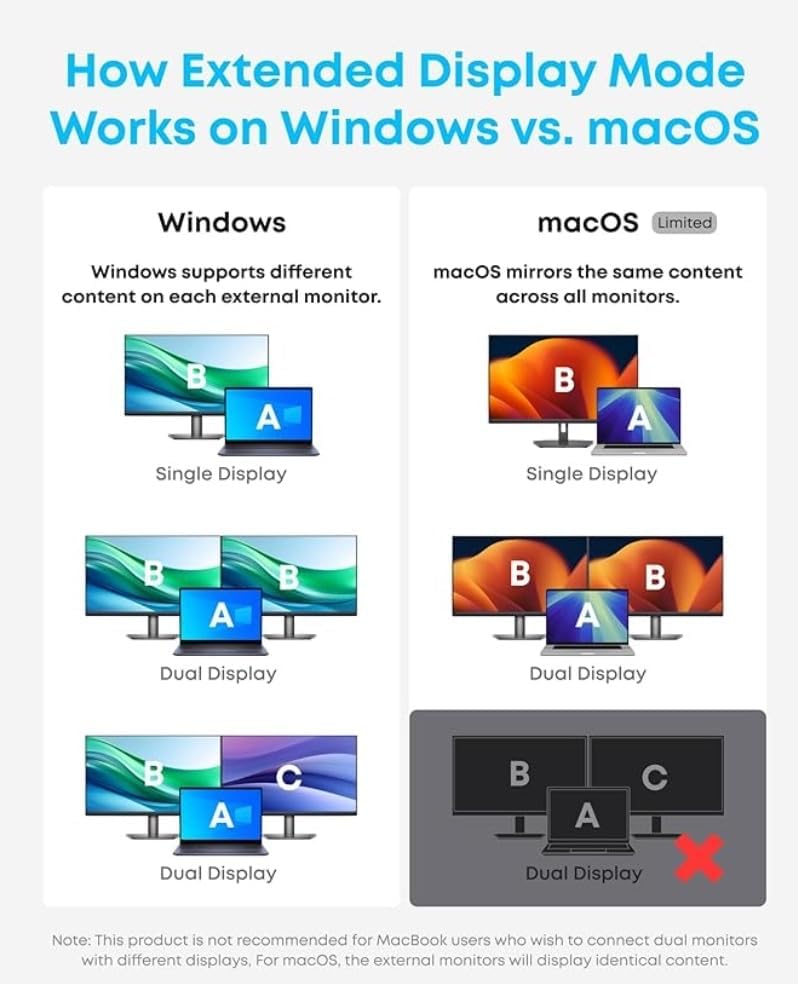
Thirteen of the 100 reviews mention a Mac or a MacBook, and the sharpest divide among them is how many screens you want.
For a single external display, Mac owners are among the happiest buyers here. One reports using three of these daily for over a year without a single issue, expanding the connectivity on MacBooks that only carry USB-C ports. Another calls it plug and play on a MacBook and likes that the short attached cable “does not obstruct any of the other ports on the Macbook, unlike some other dock devices”.
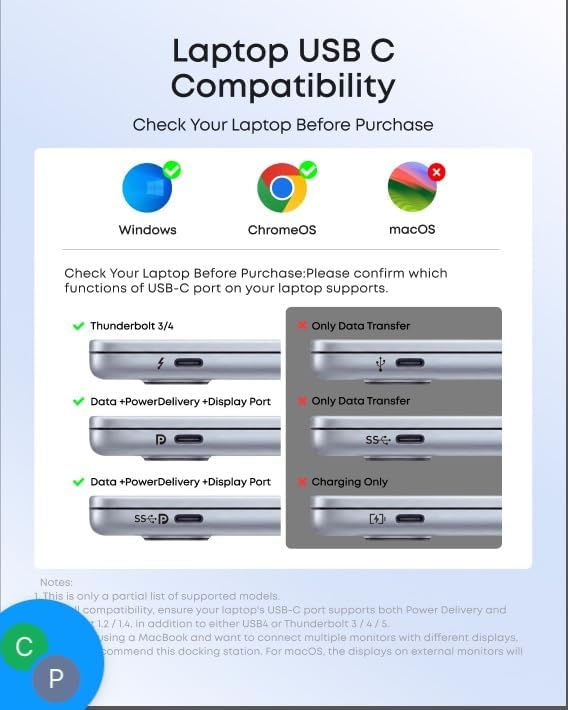
For two displays, Anker itself tells you not to. The fourth listing image is a Windows versus macOS diagram which ends with a note in Anker's own words: this product is not recommended for MacBook users who wish to connect dual monitors with different displays, and for macOS the external monitors will display identical content. A fifth image puts a red cross beside the macOS logo under the heading “Check Your Laptop Before Purchase”, next to green ticks for Windows and ChromeOS.
Two reviewers reached the same conclusion the slow way. One five-star review is a warning rather than a complaint: “very good.. but reminder, if you have a Macbook, check ability to use dual monitor function”. An owner of nearly four years notes that on a Mac, “on many machines you can only have one additional screen”. Neither knocked the product for it. Both would have saved themselves the trouble by opening image four.
85W Out, and the Slow Charging Warning Anker Tells You to Expect
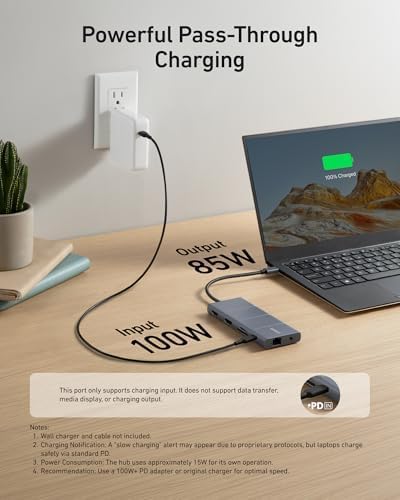
The pass-through charging image is the one that rewards a close read. It states 100W in and 85W out, then adds four notes underneath which between them predict one of the review page's recurring stories. The notes say the wall charger and cable are not included, that the hub uses approximately 15W for its own operation, that a slow charging alert may appear because of proprietary protocols while laptops still charge safely over standard PD, and that Anker recommends a 100W or higher adapter for best speed.
Now read the four-star review from a Microsoft Surface owner. The laptop threw a slow charge warning saying the voltage was lower than it needed. The reviewer's own theory was that “the hub reserves 25W for itself all the time in power delivery mode”, an estimate somewhat above the roughly 15W Anker prints. The resolution: “Anker pro-actively contacted me and the fix was to buy a USB-C power supply with more wattage (100W in my case)”. Which is exactly what note four on that image already recommended.
A two-star reviewer hit the other side of it, running a 67W charger through the dock into a MacBook Air M1 and getting power that cycled on and off until they returned it. Anker's own note points at 100W or more for best results, which a 67W unit is not. A four-star Linux and Windows user found something else worth knowing: they “needed to connect it to a USB PD power supply (using the PD socket) in order to use the monitor ports”.
The practical version: if you are buying this to drive screens, budget for a decent charger as well, because there is not one in the box. The very first review on the page is a four-star buyer who would have preferred the option of one included.
Where the 26 Critical Reviews Land
Twenty-six of the 100 most recent reviews are three stars or below. Sorted by what they are actually about, with each review counted once, they break down like this.
- Seven are hardware that stopped working: an HDMI port dying after a few uses, a USB-C data port failing inside a day, one that simply stopped after a while, and units that gave up at a month, at twelve months, at under two years, and just after the warranty expired.
- Seven are display and HDMI trouble, including the two 4K expectation mismatches above and one owner who has to unplug and replug the HDMI lead about once a week.
- Four could not get it working with their machine at all: a MacBook Pro M1 with a jumping mouse pointer, an iPad Pro 2022 that would not charge, a buyer who wanted USB-C to HDMI, and a unit where neither network nor charging worked.
- Three are build and price grumbles rather than faults, the sharpest from a returning Anker customer who remembers a metal-topped version with a velvet carry bag and finds that “The latest version of this device however is cheap plastic”.
- Two are the audio jack, one warning “I would not trust the audio jack if you value your headphones or hearing”.
- Two are the attached cable being too short for the buyer's setup.
- One is the power pass-through cycling on and off.
The cable point is smaller than a keyword search suggests. Five of the 100 reviews say the attached lead is too short or ask for a longer one, and one reviewer likes it precisely because it is short and keeps the laptop's own ports clear.
The longevity cluster is the one to weigh, and it has a real counterweight on the same page. Against the buyers whose units died inside two years sit an owner running three of them daily for over a year without a fault, a buyer of nearly four years still using theirs with two screens and a USB mic, and one who says that next to other docks of the same budget “this one has lasted far longer and still going”.
One number needs care. These 100 reviews average 4.13, while the lifetime figure on the listing is 4.5 from 36,894 ratings. The 4.13 is not this product's rating. It is the temperature of the newest hundred, and it runs cooler than the lifetime score. That gap is the most useful thing in the review data, and it is why the longevity complaints are worth more attention than a glance at the star bar would give them.
One caveat on the sample. Amazon pools reviews across Anker's dock range, and two of the 100 are visibly about a different model: one buyer describes an “Anker 8-in-1 device”, another opens with “I recently purchased a 7-in-1 USB-C hub”. Both are five-star, both are counted in the 62 five-star reviews, and neither is about the 11-in-1 on this page. A small amount of noise, but it is there. Ninety-six of the 100 are marked verified purchases and all 100 are from the UK.
Against the Dock You Would Otherwise Buy
The realistic alternatives are a cheap unbranded hub, this, or a proper Thunderbolt dock at several times the money. The reviews are unusually clear on the first of those comparisons, because a good number of these buyers arrived from exactly there.
Six of the 100 explicitly compare it to a cheaper or older hub they have owned or tried, and all six prefer this one. One had “tried other cheaper brands of USB-C hub” and found them “poorly made or didnt work as promised and were tempremental”. One replaced a broken cheaper hub and said “the difference was night and day” on materials and transfer speed. One swapped out an older Satechi. One had bought cheaper hubs that died inside a month and was happy to pay more. One says it has outlasted other docks in the same budget bracket. One just says it is better than the one they bought before.
The dissent is worth hearing too. A four-star reviewer titles their review “Overpriced for What it Can Do” and points out you can get more ports from cheaper options that are still a good brand. One owner had to daisy-chain a second USB dock into it because it “doesn't have enough ports”, and wanted a long thin unit with all the sockets on one side. A three-star reviewer who prefers an earlier Anker model notes there is no circuit breaker button like other Anker hubs have, so it has to be unplugged to stop it drawing power. If your priority is port count per pound rather than build quality, they have a point.
Buy it if you want one cable into a Windows or ChromeOS laptop, a wired gigabit connection, one screen at 4K60 or two at 2K60, and a card reader you will actually use. It is a well-made mid-range dock and the buyers who came to it from cheaper or older hubs are clear that it was an upgrade. Check today's price on Amazon before you commit, because it moves around.
Look elsewhere if you want two 4K screens, if you are on a MacBook and want two different displays rather than a mirror, if your desk needs more than a short attached cable, or if you need the audio jack to be dependable.
Our rating: 4.2 out of 5. The hardware is good and the port set at this price is hard to fault. What pulls it back is a longevity pattern in the recent reviews that the lifetime score smooths over, and Anker's habit of putting the decisive specs in pictures rather than words, which costs it real buyers who return it for doing exactly what it says it does.
Anker 565 USB-C Hub (11-in-1) Docking Station
Gigabit Ethernet, 4K HDMI and DisplayPort, 10 Gbps USB-C and USB-A, SD and microSD slots and 85W pass-through charging, from one USB-C port on your laptop.